- Published on
How We Migrated Our Next.js Frontend from Pages Router to App Router



We started building the Swypex frontend in 2022. At the time, only the Pages Router was available. The App Router didn't exist.
When Vercel introduced the App Router in May 2023, we had already built a large portion of the app using Pages Router paradigms, so migration effort couldn't be justified yet for a few reasons:
The App Router introduced a completely new paradigm with RSC and Streaming, and we didn’t fully trust it in production yet. While the Pages Router had been around for years, it was battle-tested, and its edge cases were well known.
Most importantly, building our core business features that customers need was more important than doing an internal migration that would provide little value to users.
Two years later, the App Router matured significantly and had enough features and improvements to justify the migration.
In this post, we walk through why we migrated, what we learned, how different parts of our system adapted to the App Router, the technical difficulties that came up, and whether it was actually worth it.
Why we finally decided to migrate
1. Server-first architecture with React Server Components
The biggest change introduced by the App Router is its server-first architecture. By default, everything runs on the server. Only interactive parts (button clicks, form inputs, client-side state) need to run on the client. This has several important benefits:
Less JavaScript shipped to the browser: This means faster page loads, less work to be done by client, better SEO because search engines see actual HTML instead of an empty container, and better performance.
Better community + Vercel support: The App Router is the recommended approach by Vercel going forward, all the focus and energy will be going to it instead of the Pages Router, and having better support is always important.
Faster data fetching: Because data that components need is fetched directly on the server during render. In the Pages Router, your browser had to make 2 roundtrips to the server to fully render a component:
- Make a request to get the page's JavaScript code
- Run the JS, then make a fetch request to get the data the component needs
Now, the browser needs a single roundtrip to the server:
- Make a request to get the page
- Page fetches the data it needs server-side while it renders
- Browser receives the raw HTML
A simpler and cleaner data-fetching model: In the App Router, we don't need getServerSideProps, getStaticProps, or getInitialProps anymore. Instead, data fetching happens directly inside components using normal async functions.
Using Pages Router:
    export async function getServerSideProps() {
      // This runs on the server, and the result
      // is passed to the client component below
      const res = await fetch('https://jsonplaceholder.typicode.com/api/data');
      const data = await res.json();

      return {
        props: {
          data,
        },
      };
    }

  export default function Page({ data }: { data: string }) {
    // This component runs on the client
    return (
      <div>
        <p>{data}</p>
      </div>
    );
  }
Using App Router:
export default async function Page() {
  const res = await fetch('https://some-endpoint.com/api/data')
  const data = await res.json()

  // This component renders on the server,
  // and only the resulting HTML is sent to the browser
  return (
    <div>
      <p>{data}</p>
    </div>
  )
}
With the App Router, data fetching has less boilerplate, less mental overhead, and is more readable and predictable.
2. Better perceived performance with Streaming and Suspense
Streaming is a feature introduced in React 18 which allows the server to send HTML to the browser in chunks as soon as each part is ready, instead of waiting for the entire page to finish rendering before sending a response.
It solves a common problem we face a lot. Imagine a page with 4 components, where two components depend on slow server-side API calls.
With the Pages Router, you have to call all APIs inside getServerSideProps, wait for every single one to finish before even serving the page to the browser, and if one API call is very slow, the whole page is held hostage. Meanwhile the user is left staring at a blank screen and wondering if they clicked the page or not.
With the App Router, each component can fetch its own data directly on the server. Slow components can then be wrapped in Suspense boundaries:
export default async function Page() {
  return (
    <>
      <ComponentOne />
      <ComponentTwo />

      <Suspense fallback={<Loading />}>
        <SlowComponentOne />
      </Suspense>

      <Suspense fallback={<Loading />}>
        <SlowComponentTwo />
      </Suspense>
    </>
  )
}
Now, the user will see the page instantly, with ComponentOne and ComponentTwo fully rendered, while slow components show their own loading states (<Loading />).
Once the slow API calls finish, the server streams the remaining HTML to the browser, replacing the loading placeholders with the actual content.
3. Route-level loading and error states
Each route segment can now define its own loading and error UI easily by adding the respective special files:
└── some-page/
    ├── page.tsx
    ├── loading.tsx
    └── error.tsx
When a user visits /some-page, the loading.tsx UI shows immediately, giving better perceived performance. Once server-side code finishes executing, page.tsx content is swapped in, and if something breaks, error.tsx is shown instead:
4. Folder-based routing means better component organization
In the Pages Router, routing is file-based, which makes organizing page-specific components awkward. If a component is only used by a single page, there’s no natural place to put it. This led us to have large, generic components folders.
└── pages/
    ├── page-one.tsx
    ├── page-two.tsx
    └── components/
        ├── pageOne/
        │   ├── ComponentOne.tsx
        │   └── ComponentTwo.tsx
        └── pageTwo/
            ├── ComponentOne.tsx
            └── ComponentTwo.tsx
The App Router uses folder-based routing, so we can co-locate page specific components directly inside the page folder. For example:
└── app/
    ├── page-one/
    │   ├── page.tsx
    │   └── components/
    │       ├── ComponentOne.tsx
    │       └── ComponentTwo.tsx
    └── page-two/
        ├── page.tsx
        └── components/
            ├── ComponentOne.tsx
            └── ComponentTwo.tsx
The migration process
We were already on Next.js v13, so no major version upgrades needed. Our plan was to:
Upgrade our i18n library (next-intl) to v3 (the version that supports app router)
Move some of our authentication logic from
getServerSidePropsto middleware, this turned out to be harder than we expectedSetting up the
/appdirectory and move global context providers from/pages/_app.tsxto the root app router layout/app/layout.tsxStart incrementally migrating pages and API Routes from
/pagesto/appone by one
1. Upgrade our i18n library (next-intl) to v3
After upgrading next-intl to v3, we had to address a few breaking changes to make it App Router compatible.
The biggest change was migrating to a locale-based file structure, so instead of having /pages/page-one.tsx, we have to move to /pages/[locale]/page-one.tsx
We started by creating a /i18n/routing.ts file to define the routing rules for next-intl
export const routing = defineRouting({
  // our app supports english and arabic
  locales: ['en', 'ar-EG'],
  defaultLocale: 'en',
})

// Lightweight wrappers around Next.js' navigation APIs
// that will consider the routing configuration
// so if you use these to navigate to /some-page,
// it will automatically convert to /[en|ar-EG]/some-page
export const { Link, redirect, usePathname, useRouter } = createNavigation(routing)
Then we had to replace every import from next/router to use the newly exported wrappers from i18n/routing.
before:
// also applies to Link, redirect, usePathname.
import { useRouter } from 'next/router'
after:
import { useRouter } from '@/i18n/routing'
With that, our navigation automatically handles locale prefixes.
2. Moving our refresh token logic to the Middleware
Our app uses encrypted cookie-based sessions, when a user tries to visit a page, the Next.js Server needs to first get the session data from the cookie, refresh it if it's expired, then serve the page
In the Pages Router, this was handled in getServerSideProps:
  export const getServerSideProps = async (context) => {
    const { req, res } = context;
    // gets the session data from the request cookies
    const session = await getSessionData(req, res);

    // updates the response cookie to include the newly created session
    await refreshAccessToken(session);

    // now the response includes the new encrypted cookie
    // and the browser has a fresh access token
    return { props: { ... } };
  };
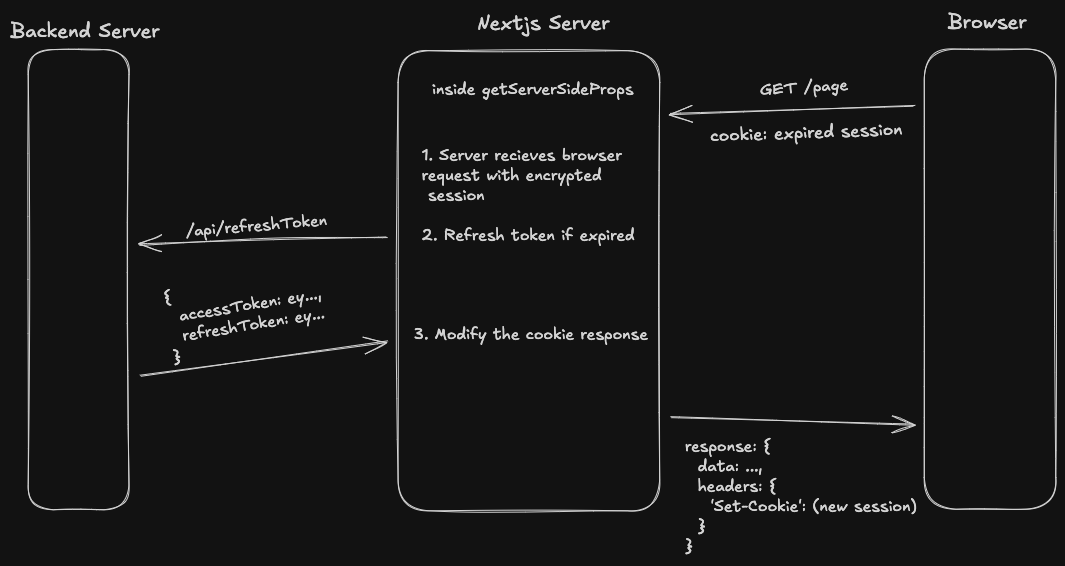
We thought that migrating this to the App Router is easy. Instead of updating the cookie in getServerSideProps, we just update it in the React Server Component directly like this:
  export default async function Page(): Promise<ReactComponent> {
    // we don't have access to the req object in RSC, so we get session from cookies directly
    const session = await getSessionDataFromCookies();

    // ERROR! You can't modify cookies in a Server Component
    await refreshAccessToken(session);

    return <Component />;
  }
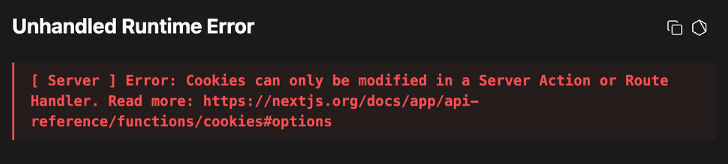
This is because in the App Router, Server Components are render-only, they don’t control the HTTP response. Since setting cookies is a side-effect, Next.js throws an error when trying to mutate cookies during rendering.
Our options to update the cookie were limited to either:
- Middleware.ts
- Route handlers
We chose the Middleware approach, since it runs automatically for every browser request
  export default async function middleware(
    req: NextRequest
  ): Promise<NextResponse> {
    const session = await getSessionDataFromCookies();

    await refreshAccessToken(session);

    return NextResponse.next();
  }
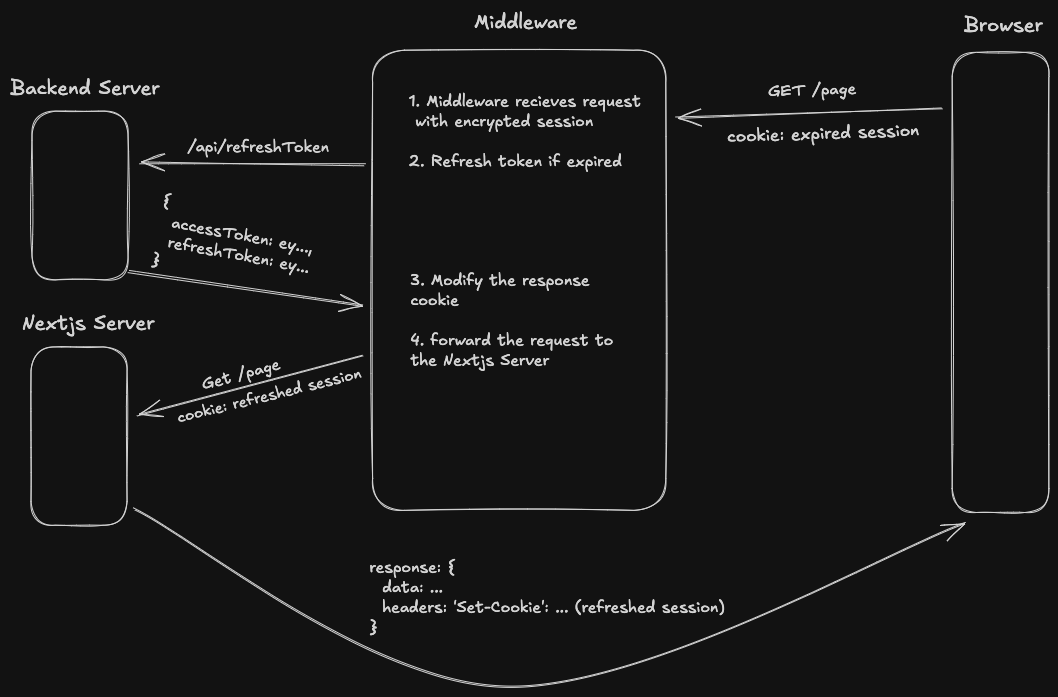
Problem solved. Now for every request the browser makes to the Next.js server, we check for the expired token before the page even renders.
3. Setting up the /app directory and moving all our global context providers to the root layout.
Luckily, Next.js can run both Routers simultaneously, this allows us to migrate pages incrementally and test each page in isolation.
In the Pages Router, we had two different global wrapper files:
_app.tsx: handled global context providers and React related logic
  export default function App({ pageProps }: AppProps): ReactComponent {
    return (
      // setup application fonts
      <main className={`${inter.variable} ${cairo.variable} font-sans`}>
        <ContextProviders>
          <Component {...pageProps} />
        </ContextProviders>
      </main>
    );
  }
_document.tsx: handled HTML Structure, Meta tags, CSS or JS files, etc.
  export default function Document(): ReactComponent {
    return (
      <Html className="...">
        <Head />
        <body className="...">
          <Main />
          <NextScript />
        </body>
      </Html>
    );
  }
The App Router combines these two files into just one, the global Layout.tsx file:
  export default async function RootLayout({
    children,
    params,
  }: {
    children: ReactComponent;
    params: LayoutProps<'/[locale]'>['params'];
  }): Promise<ReactComponent> {
    return (
      <html lang={locale} className="...">
        <body className="...">
          <main className={`${inter.variable} ${cairo.variable} font-sans`}>
            <ContextProviders>
              {children}
            </ContextProviders>
          </main>
        </body>
      </html>
    );
  }
Now we have one layout file containing all our global logic and wrapping all the pages in the /app directory, and the best part is that we can leave the _app.tsx and _document.tsx files untouched so that we can compare behaviors between the Pages Router and the App Router.
4. Incrementally migrate pages and API Routes from /pages to /app one by one
Now for the real migration, let's take our Cards page as an example:
// Pages Router
  export const getServerSideProps = async (context) => {
    const { data } = await query({ query: GET_CARDS });

    return { props: { cards: data.cards } };
  };

  export default function Cards({ cards }: CardsProps): ReactComponent {
    return (
      <>
        <Head>
          <title>Cards</title>
        </Head>

        <div>
          {cards.map((card) => (
            <p>{card.name}</p>
          ))}
        </div>
      </>
    );
  }
The first step to migrate is to move all server code inside getServerSideProps into a Server Component, then render the rest of the page as a client component.
// App Router

  // app/cards/page.tsx
  export default async function Page(): Promise<ReactComponent> {
    const { data } = await query(GET_CARDS);

    return <Cards cards={data.cards} />;
  }


  // app/cards/components/Card.tsx
  'use client'

  export default function Cards({ cards }: CardsProps): ReactComponent {
    const [cardOpen, setCardOpen] = useState(false)

    return (
      <>
        <div>
          {cards.map((card) => (
            <p>{card.name}</p>
          ))}

          <div>
            ...
          </div>

          <button onClick={() => setCardOpen(true)}>Open Card</button>
        </div>
      </>
    );
  }
The flow looks like this in the above code:
- Browser requests the /cards page
- The server calls backend GraphQL API to get cards data
- The server sends down the
<Cards />component to the browser as JavaScript (as it's a client component!) - Browser renders the received component.
You will notice that this is almost identical to the Pages Router behavior, the server does some work, sends data and JavaScript to the browser, browser runs the JavaScript and renders components.
But we recommend doing this as a first step in the migration, even if the performance gains aren't huge, because this will set you up for more optimizations in the future.
Later on, we can move more and more logic up to the server, leaving only client interactions like useState and button clicks as client components
Once the page is fully optimized for the App Router, the performance gains are massive. The browser receives mostly ready-to-render HTML instead of a large JS bundle, and less round-trips are made from the browser to the server because API calls are called alongside the RSC while rendering.
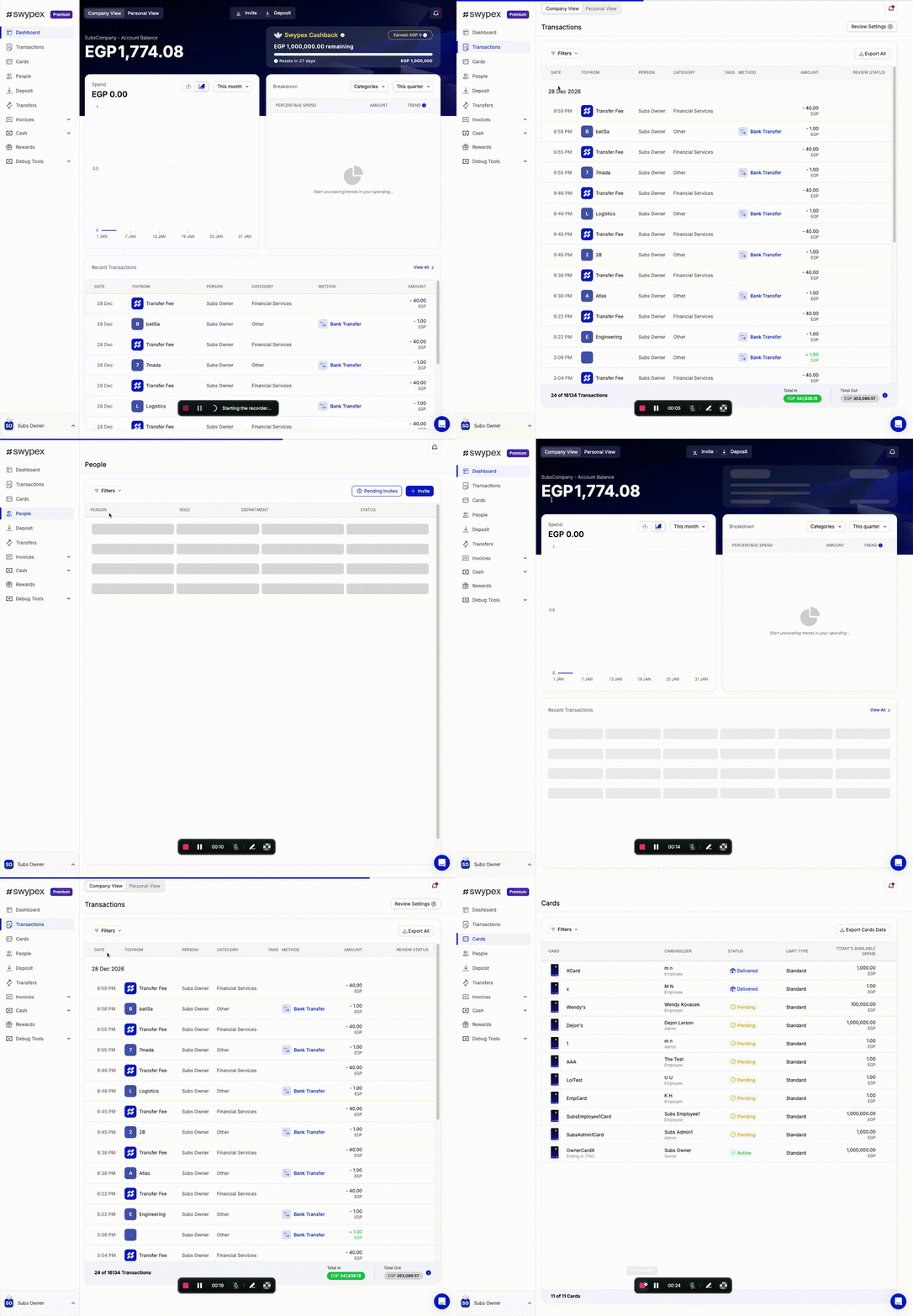
Making page navigation feel instant with loading.tsx
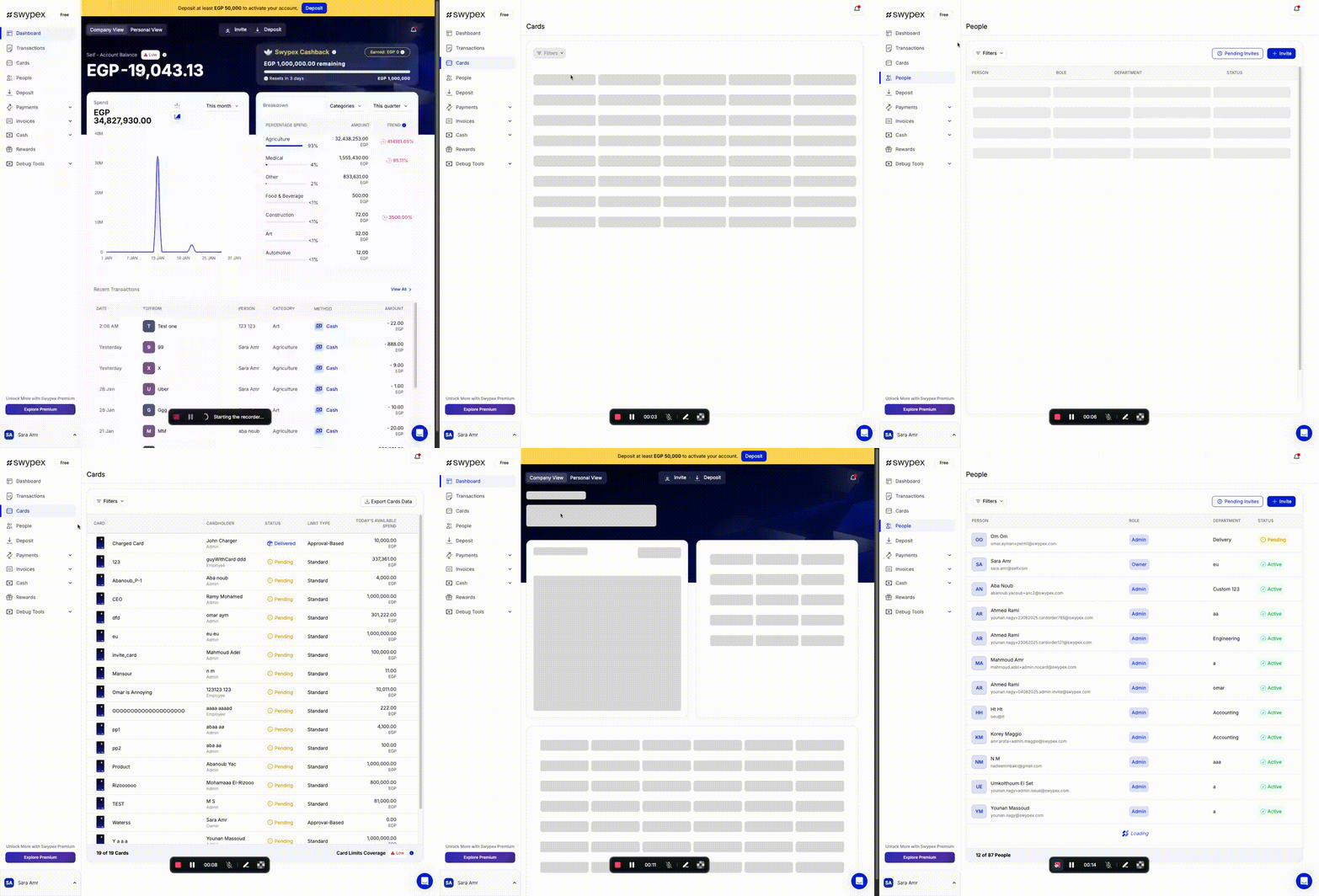
In the Pages Router, when navigating between pages, the browser has to wait for the entire page JS bundle to download before anything appeared, this means that navigating between pages is slow and unresponsive.
The App Router allows us to add a /app/cards/loading.tsx file that will show up instantly as soon as the browser requests the /cards page, then it will be replaced with the actual page content once the server finishes executing.
Here is what our loading.tsx file for the cards page looks like
  export default function Loading(): ReactComponent {
    // a simple component that shows all the sections in the page as skeletons
    return <LoadingSkeleton rows={8} cols={5} />;
  }
here is a comparison between our previous Pages Router app and App Router code showing the difference in navigation speeds
| App Router | Pages Router |
 |  |
Conclusion: Was It Worth It?
We had to completely re-write our refresh token logic. Upgrade packages to be App Router compatible. Learn new patterns and paradigms and then re-test everything to make sure we didn't break our app. While also maintaining current behaviour, apply bug fixes and work on new feature projects.
But looking back, we think it was worth it; The app feels noticeably snappier. Page transitions are now almost instantaneous, and there's still more performance gains to unlock by moving more and more logic to the server.
Beyond performance, we're actually using the latest React features like Streaming, Suspense and Server Components to stay up to date with the ecosystem.
Also, these re-writes and refactors gave us a much deeper understanding of our own app, rewriting our auth and data fetching flows helped us develop a clearer mental model of how everything fits together.
If you are planning to migrate, we recommend doing it as early on in the codebase's life as possible, because it gets harder the bigger the codebase becomes.